Linux – Managing applications running on system start-up
Rcconf is a tool that we recently discovered. This tool allows you to manage your start-up applications easily.
We found this tool when me and my colleague Aman were trying to identify the processes that we never use but they do eat up a lot of our system resources. We found this link very useful: http://www.debianadmin.com/manage-linux-init-or-startup-scripts.html.
The other way to manage system start-up applications is as the page suggests, by using update-rc.d, but rcconf provides an interface which is easy to understand and use.
To install rcconf, run the following command on your command line:
sudo apt-get install rcconf
To run rcconf, you’ll need sudo privileges:
sudo rcconf
The application looks like :
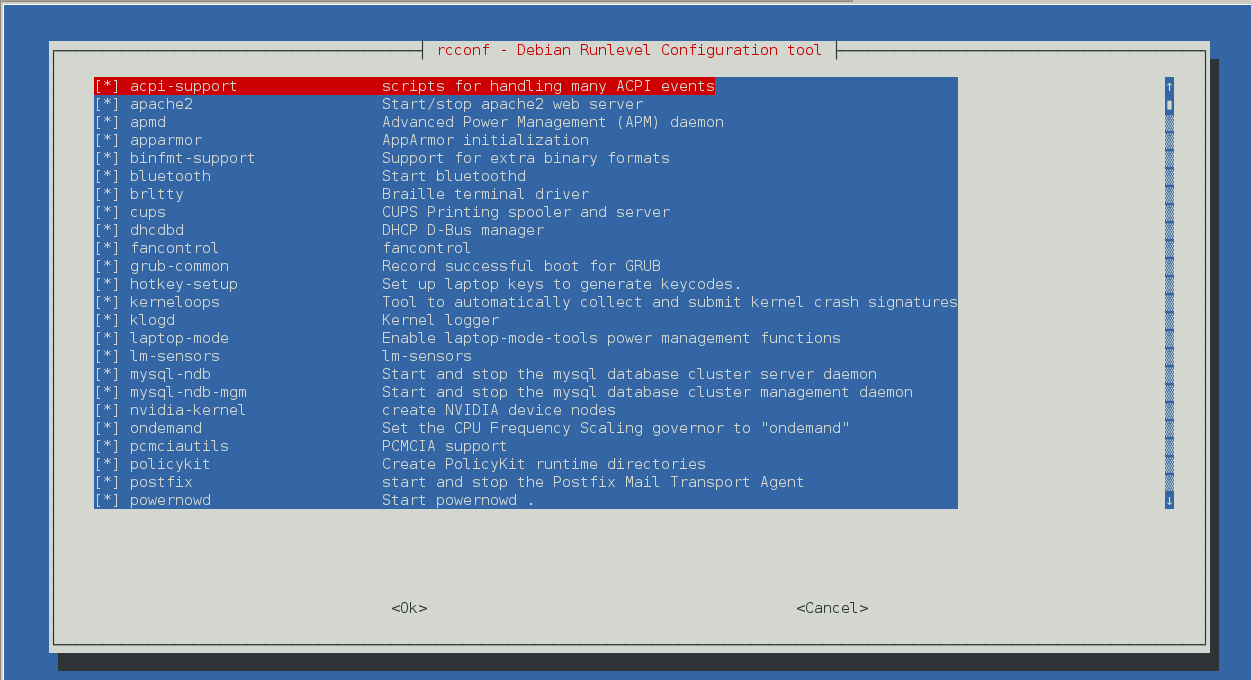
* means that application is a part of startup
Use spacebar to uncheck the application
Save the settings and restart your linux box. I removed unused applications like postgres, tomcat, monit, bluetooth etc.
And my system does feel a bit faster 🙂
Regards
~~Himanshu Seth~~
http://www.tothenew.com